From yeast pitch to finished bottle · beer, wine, mead, cider
Know exactly where every batch stands.
One timeline per batch, from yeast pitch to finished bottle. Every gravity reading, addition, racking, bottle and tasting lands on it, in order. The curve tells you when to rack. Reminders tell you before you forget.
FREE DURING EARLY ACCESS · NO CARD · WORKS ON YOUR PHONE
One timeline01Every reading, addition
and transfer, in order
Pitch to bottle
and transfer, in order
Pitch to bottle
Every style02Beer, wine, mead, cider
Stages adapt to type
No beer-only forms
Stages adapt to type
No beer-only forms
Brew-room ready03Phone first
Log under your thumb
Reminders before you forget
Log under your thumb
Reminders before you forget
Yours to keep04Free during early access
Plain-text export
Invite-only sharing
Plain-text export
Invite-only sharing

01 / 05
The product, screen by screen.
Real screenshots. Demo data.
Beer, wine, mead, cider.
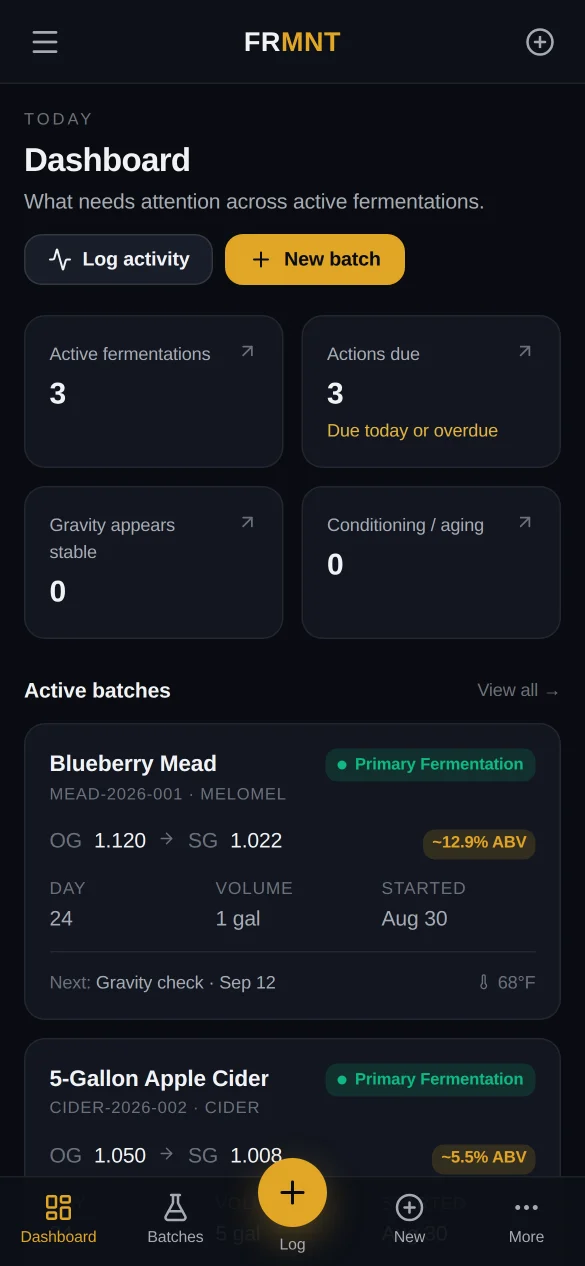
01 · DASHBOARD
What needs attention today
Active fermentations, actions due, batches that look stable, batches aging. Every card is a link. Tap Actions due and you land on the calendar with today's list.
02 · BATCH
One batch, one curve, one record
OG, latest SG, estimated ABV and volume up top. The gravity curve below. Recent activity, summary and reminders beside it. Log gravity is the biggest button on the page.
03 · ANALYTICS
Compare seasons and siblings
Split a carboy into three experiments and each child carries the parent's curve as a dashed line. See which yeast, which nutrient schedule, which temperature actually won.
04 · SOPs
Procedures you will actually follow
Paste your sanitization routine as a paragraph. Get numbered steps, tips, warnings and quality checks, in a layout that prints clean and hangs on the wall.


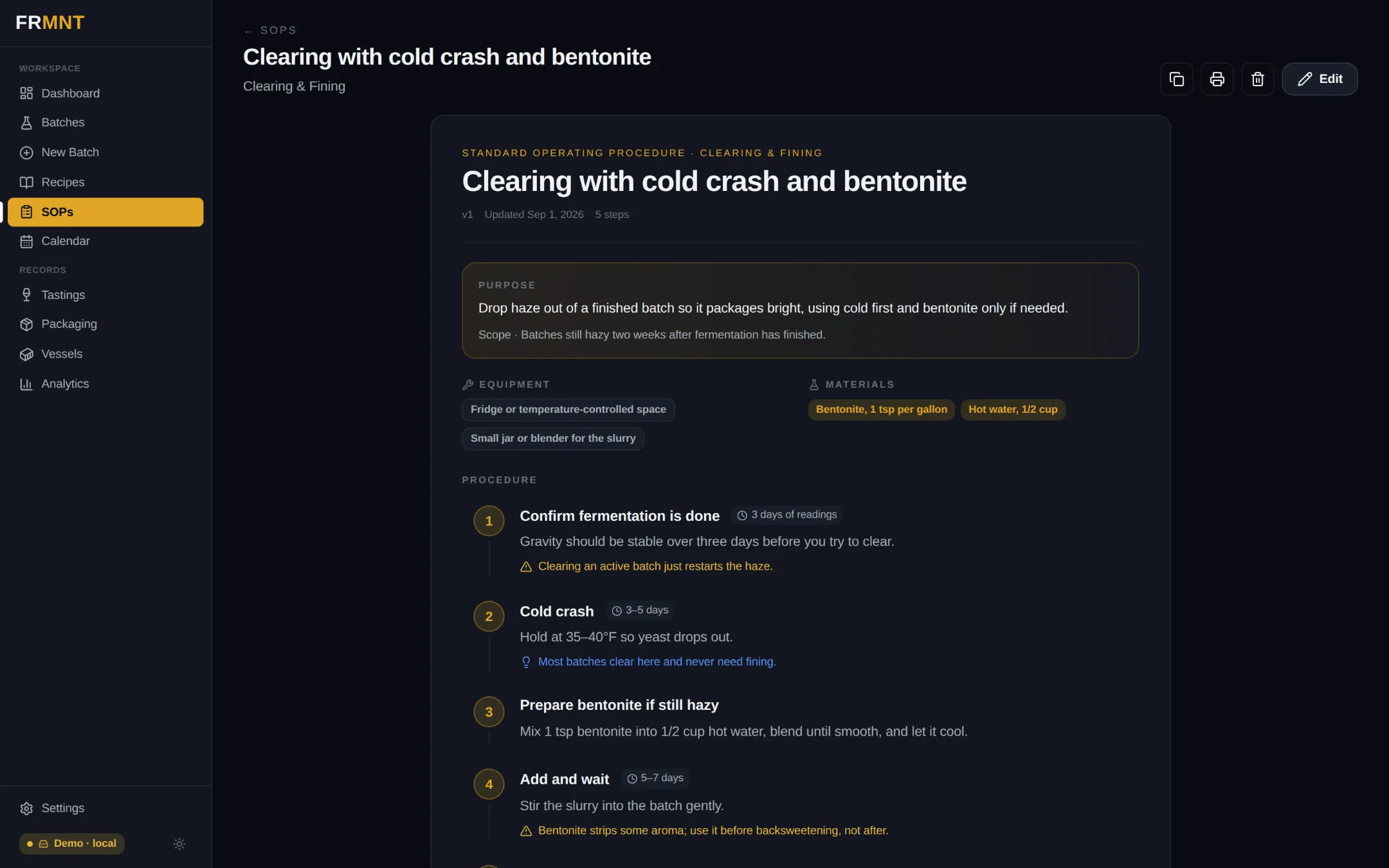
FIG. 01 · PRODUCT1 / 4
02 / 05
The Timeline is the whole idea.
Everything else derives
from one ordered record.
Log the reading.
The rest is arithmetic.
Every event lands on the batch's timeline with its day number. Charts, ABV, stability detection, reminders and the dashboard are all just views of that record. Nothing is typed twice, nothing drifts.
03 / 05
Everything it tracks.
Ten records.
One batch.
001ReadingsGravity and temperature with the day number. Titles are derived from the numbers, so SG 0.997 never turns into 1.000.SG to 0.001
002AdditionsNutrients, fruit, oak, acid, tannin. Amount, unit, stage. Staggered nutrient schedules stay on the curve where they happened.by stage
003Transfers & splitsRack to a new vessel or split one batch into many. Children keep the parent history as a dashed reference line.parent → child
004Stabilize & backsweetenSulfite and sorbate doses, then sweetening events with target gravity, recorded as first-class steps.dose + target
005PackagingBottles, kegs, priming or forced carbonation, volume packaged, what's left in the vessel.per package profile
006TastingsNotes over months, tied to the batch and the day. The record that makes next year's batch better.dated
007RemindersPer-batch, due-dated, on one calendar. The dashboard counts what is due today or overdue.calendar
008RecipesStart batches from recipes. Import one from a photo of a notebook page or a screenshot.photo → recipe
009SOPsRough text in, structured procedure out. Versioned, categorized, print-ready.AI formatted
010MembersInvite a brewing partner as an editor or a friend as a viewer. Viewers can't change a thing.owner · editor · viewer
What you paste
ok so first mix star san 1oz per 5 gal, contact time 1-2 min, don't rinse. dunk everything, racking cane, tubing, airlock, bung. tip: foam is fine. warning don't use bleach on stainless. check: everything wet at least 60 sec before it touches must…
Format with Claude
- Numbered steps with durations, tips and warnings pulled out of the prose.
- Equipment, materials, safety and quality checks as their own sections.
- Print it, copy it, version it. The plain text stays yours.
04 / 05
Why not the notebook?
What brewers use today,
and where it breaks.
NotebookSpreadsheetRecipe-calculator appsFRMNT
Beer, wine, mead and cider as equalsYesIf you build itSomeYes
Curve, ABV and stability from readingsNoIf you build itYesYes
Reminders tied to the batch stageNoNoSomeYes
What's due today, across every batchNoNoVariesYes
Splits and racking keep the historyMessyMessyVariesYes
Paste a procedure, get a formatted SOPNoNoNot foundYes
Recipe from a photo of your notesNoNoNot foundYes
Owner, editor and viewer roles on the recordHand it overLinkRecipes onlyYes
"Recipe-calculator apps" means the beer-first tools most home brewers already know. They are very good at beer math and some have solid reminders. Checked against their public docs in September 2026; "Not found" means we couldn't find the feature, not that it can't exist.
From the founder
"I built FRMNT because notebooks, spreadsheets and phone notes are cumbersome and unorganized. I wanted one snapshot for every brew, in my pocket."Chris G. · founder, and FRMNT's first daily user
05 / 05
Free right now.
Hobby is open today.
Paid tiers are still being priced.
Open now
Hobby
$0during early access
Everything you need for your first carboys.
- 3 active batches
- Full timeline, curves, ABV
- Reminders and calendar
- AI-formatted SOPs (5)
- Recipe import from photos
- Phone and desktop
Coming soon
Brewer
TBD/ month
For the shelf that keeps filling up.
- Unlimited batches and vessels
- Unlimited AI SOPs and imports
- Splits, siblings, comparisons
- Analytics across seasons
Coming soon
Cellar
TBD/ month
Clubs, shared brew rooms, small producers.
- Everything in Brewer
- Invite editors and viewers
- Owner-managed roles
- Priority support
What does FRMNT actually track?
Everything from yeast pitch to finished bottle, on one timeline per batch: gravity and temperature readings, nutrient and other additions, racking and splits, stabilizing and backsweetening, packaging, tastings and reminders. The curve, ABV and "is it stable yet" come from those readings automatically.
Which kinds of brewing does it cover?
Beer, wine, mead, cider, plus kombucha and seltzer. Stages, additions and packaging adapt to the type, so a lager and a melomel don't share a form.
How is it different from Brewfather, Brewer's Friend or BeerSmith?
Those are recipe and calculator tools built around beer, and they are very good at beer math. FRMNT is built around the record: what happened to this batch, when, and what's due next, for any style. It also formats SOPs from pasted text and reads recipes from a photo, which we haven't found in those apps.
How does the gravity curve know when to rack?
Every reading lands on the timeline with its day number. When the last few readings stop moving, the batch is flagged as stable on the dashboard, and the estimated ABV updates with each entry. You decide; FRMNT just makes the signal obvious.
Can I split one batch into several experiments?
Yes. Split a carboy into as many children as you want. Each child keeps the parent's curve as a dashed reference line so you can compare yeasts, nutrients or temperatures side by side.
What do the AI features do, and what do they see?
Two jobs. Paste a rough procedure and get a formatted SOP with numbered steps, tips, warnings and checks. Snap a photo of a recipe or notebook page and get ingredients, yeast and volumes filled in. Only the text or image you choose is sent. Your batch data is never used for training.
Does it work on my phone in the brew room?
It is built for that. Add it to your home screen and it runs like an app, with big tap targets, a log button under your thumb, and dialogs that stay clear of the browser bar.
Can family, a brewing partner or a club see my batches?
Yes. The owner invites people by email as editors or viewers. Editors can log and change things, viewers can only look. Access is by invitation, so nobody sees your data without being added.
Is it really free?
During early access, yes: three active batches, the full timeline, reminders, five SOPs and recipe import, no card. Paid tiers are coming and will be priced before they open.
Can I get my data out?
Yes. Batches and SOPs export as plain text, SOPs print clean, and you keep everything if you cancel.
Start the record
Free during early accessThree batches, the full timeline, reminders, AI SOPs. No card.
Yours to keepExport everything as plain text, any time.